Work with Selected Items
Purpose
Select several files or folders in the document library and copy, move, share, or delete them in one step.
Prerequisites
- You are signed in to EisenVault One.
- You can open the folder that contains the items.
- You have permission for the action you choose on each item.
Before You Begin
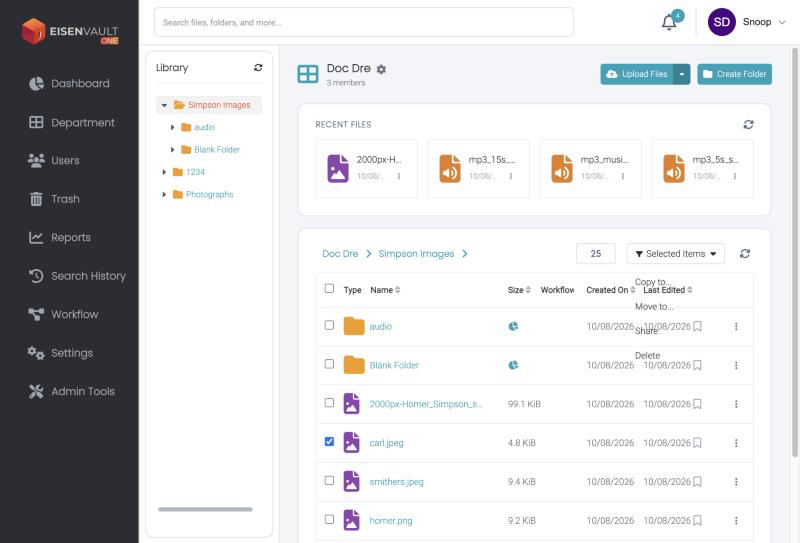
Each row in the document library has a checkbox. Ticking any checkbox turns on the Selected Items menu above the list. Tick the checkbox in the heading row to select every item on the page.
The Selected Items menu offers:
| Action | What it does |
|---|---|
| Copy to... | Copies the selected items to another folder. |
| Move to... | Moves the selected items to another folder. |
| Share | Shares the selected files externally. See Share a Document Externally. |
| Delete | Moves the selected items to the trash. |
Share works on files only. If you select only folders, Share is unavailable. If you select files and folders together, EisenVault One warns you that folders are excluded and shares only the files.
Use Selected Items
- Open the folder in the Explorer.
- Tick the checkbox beside each item you want.
-
Click Selected Items.
-
Choose an action and follow the prompts.
Expected Result
- The action is applied to every selected item you have permission for.
- Deleted items can be restored from the trash. See Restore from Trash.