Active Departments
Purpose
See which departments had document activity during the selected period. The Active Department overview card shows how many departments recorded events; the Active Department list shows each department with create and modify counts.
Note: This action may require administrator privileges.
Prerequisites
- You are signed in to EisenVault One as a system administrator.
- You can open Dashboard from the left navigation.
Before You Begin
- EisenVault One may label this area Department or a custom department label from globalization settings.
- Activity includes document creates and modifications attributed to the department in the selected date range.
- Click the Active Department card to open the list.
View Active Departments
- Open Dashboard.
- Set the date range, then click Apply Filter.
- Note the Active Department count.
- Click the card to open the list.
Work with the Active Department List
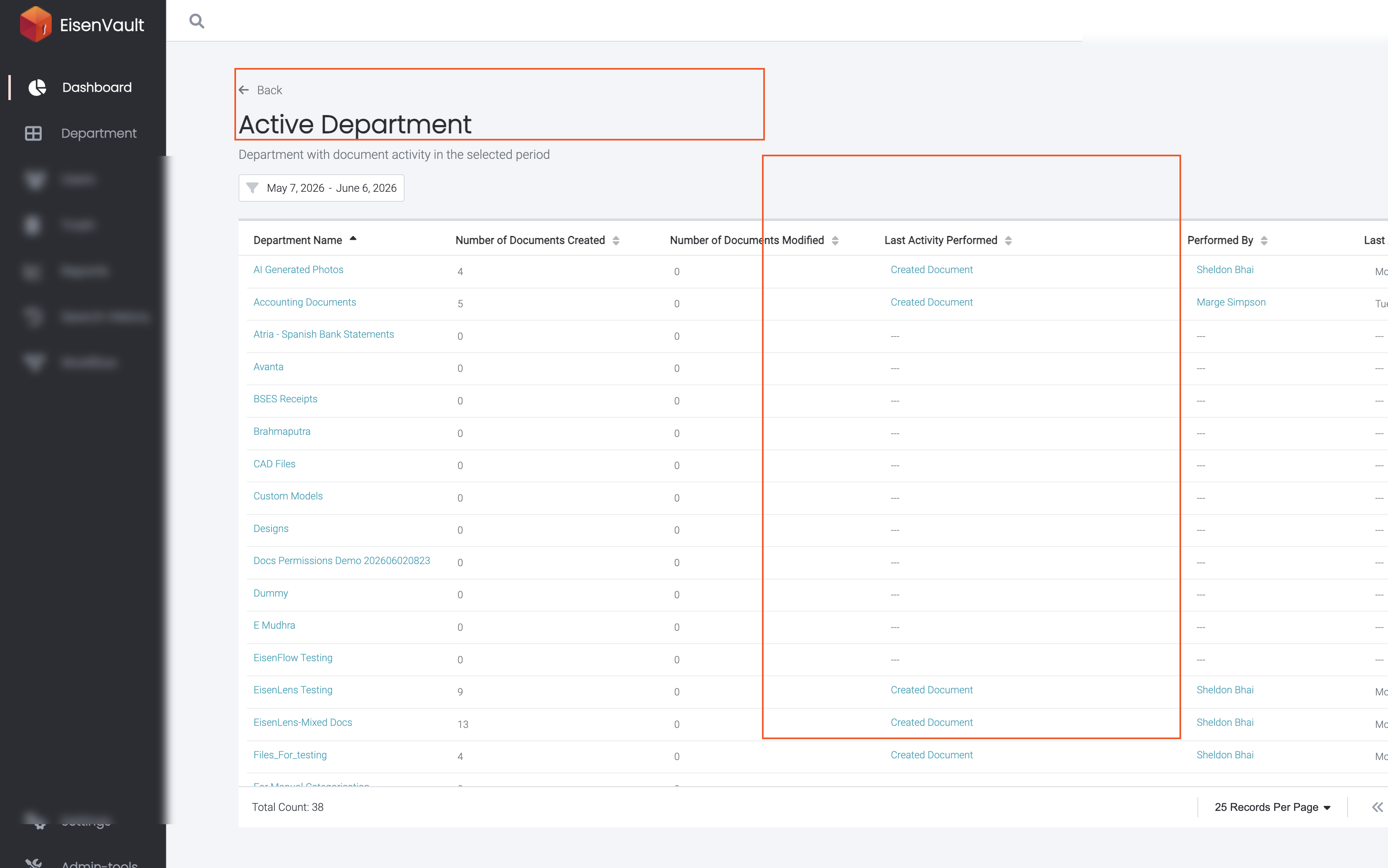
On the Active Department page:
- Confirm the subtitle Department with document activity in the selected period.
- Sort by Department Name, Number of Documents Created, Number of Documents Modified, Last Activity Performed, Performed By, or Last Activity Date.
- Click a department name to continue investigating in the document library when available.
- Click Back to return to the dashboard.
Example Walkthrough
Demonstration screenshots use redacted department and user names.
-
Open the list from the Active Department card.
Expected Result
- The overview card shows how many departments had activity in the period.
- The list breaks down creates, modifications, and last activity per department.
- Sorting updates the table without leaving the page.