Create or Edit Document Category
Purpose
Create a custom category that users can assign to documents or folders, or edit an existing category's name, description, and fields.
Document categories define the metadata fields that appear when users update metadata. A document can have only one category at a time. If no custom category is selected, EisenVault One uses Default Content Category and its default metadata fields.
Note: This action may require administrator privileges.
Prerequisites
- You are signed in as an administrator.
- You can open Admin Tools from the left navigation.
- You know whether the new category should inherit from an existing category.
Before You Begin
Categories inherit fields from their parent category. Inherited fields cannot be turned off on the child category.
If you leave Parent Document Category blank, the new category inherits from the root/default content category. Use a parent category when the new category should include another category's fields plus its own additional fields.
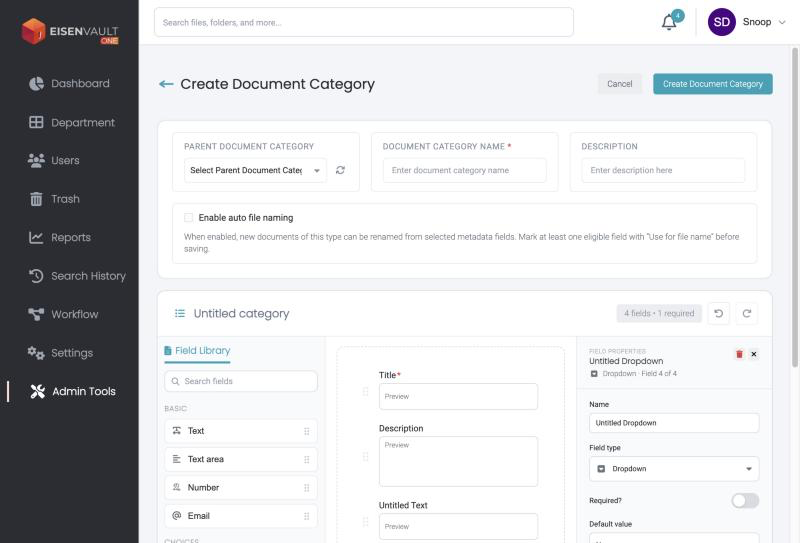
The category name, description, and fields are all edited on one page, the Create Document Category page, which has a form builder below the name fields. See Add or Remove Fields.
System categories such as Default Content Category are locked: their details and fields cannot be added, edited, or removed.
Create a Category
- Click Admin Tools in the left navigation, then Manage Categories on the Document Categories card.
-
Click New Document Category.
-
In Parent Document Category, optionally select a parent.
- Enter Document Category Name. This is required.
- Optional: enter a Description.
- Add any fields you need in the form builder below.
- Click Create Document Category.
Edit a Category
- On Document Categories, click the category name, or click Edit at the end of its row.
- Change the name, description, or fields.
- Click Save.
Avoid renaming categories that are already used in reporting unless users have been told about the change.
Delete a Category
On Document Categories, click Delete at the end of the row and confirm. Categories that are locked as system categories cannot be deleted.
Expected Result
- The category appears in Document Categories.
- Users can select the category from document and folder metadata forms.
- The category inherits fields from its parent, or from Default Content Category when no parent is selected.