Archive a User
Purpose
Permanently retire the account of someone who has left the organization.
Note: This action may require administrator privileges.
Prerequisites
- You are signed in as a user administrator or system administrator.
- You have permission to edit users.
Before You Begin
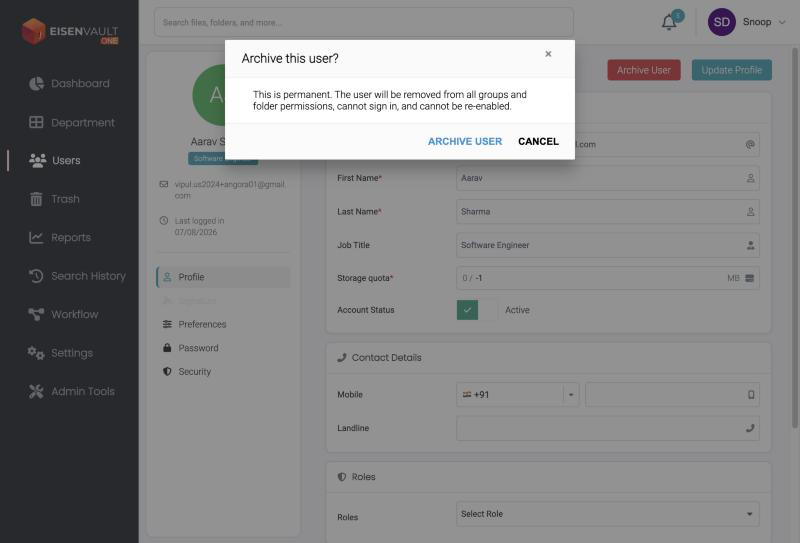
Archiving is permanent. An archived user:
- is removed from all groups and folder permissions,
- cannot sign in, and
- cannot be re-enabled.
If the person might return, turn off Account Status on their profile instead. That deactivates the account and can be reversed. See Edit a User.
Archived users stay in the list. They appear in the Users table with a grey avatar and a red ribbon, their profile is view-only, and the page notes that they cannot sign in.
Archive a User
- Open Users from the left navigation.
- Click the user's name to open their Profile page.
-
Click Archive User at the top right.
-
Read the warning, then click Archive User to confirm, or Cancel to stop.
Find Archived Users
On the Users page, open the Status filter. It has Active, Inactive, and Archived options. Clear the ones you do not want to see.
Expected Result
- The user can no longer sign in.
- The user is removed from every group and folder permission.
- The action is recorded as User Archived in the User Report.