Create Folder
Purpose
Create a new folder inside a department or an existing parent folder to organize documents.
Prerequisites
- You are signed in to EisenVault One.
- You can open the department or parent folder where the new folder should live.
- You have permission to create folders in that location.
Before You Begin
New folders inherit permissions from their parent unless your organization configures folder-level permissions differently. Choose a clear folder name that follows your organization's naming rules.
You can create folders from the document library toolbar or from a parent folder's options menu, depending on your view.
Create a Folder
- Click Department in the left navigation, select a department, and navigate to the parent folder if needed.
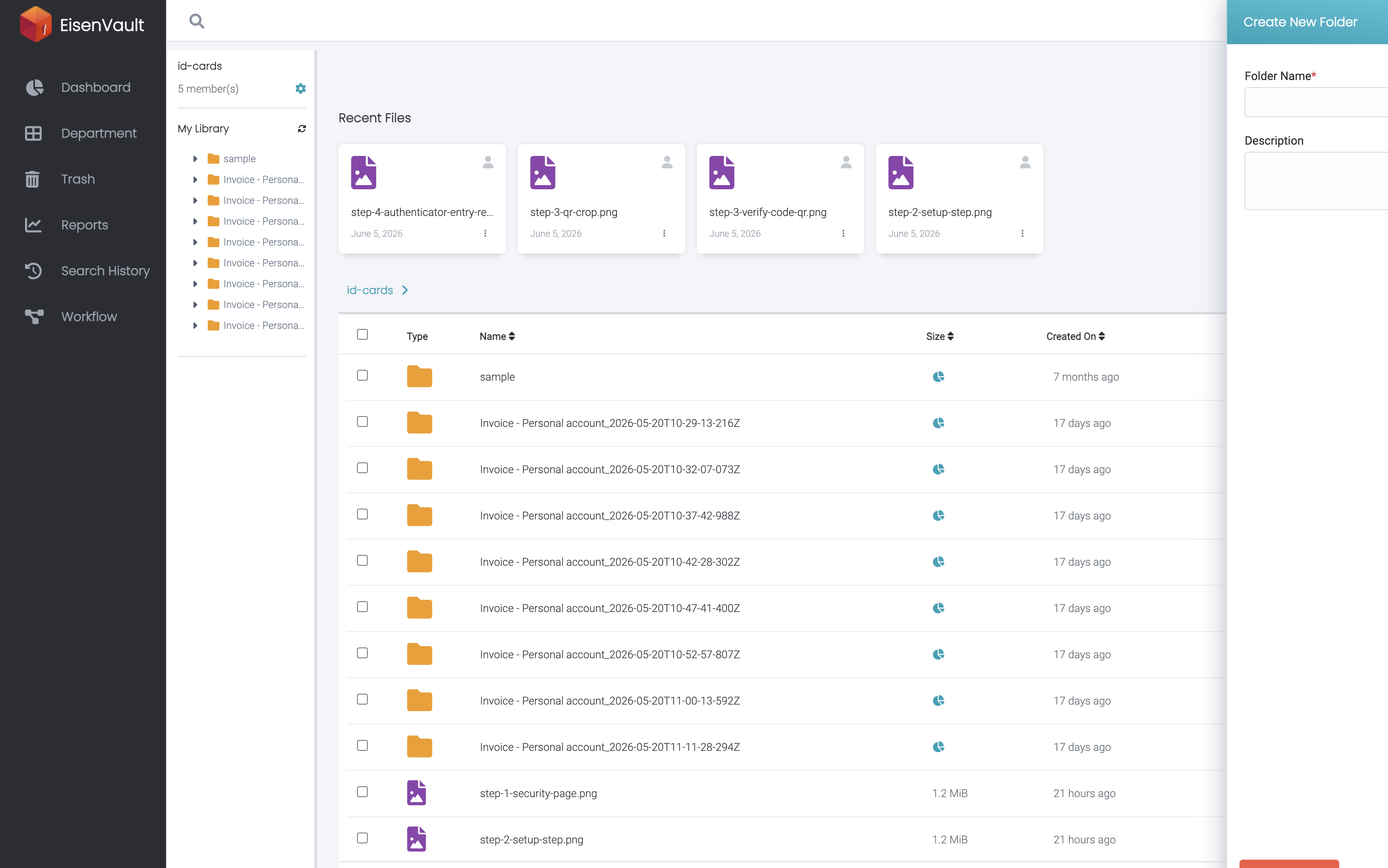
- Click Create Folder in the toolbar, or open the parent folder's options menu and choose Create Folder.
- Enter the folder name in the modal.
- Click Create or the equivalent confirmation button.
Example Walkthrough
Demonstration screenshots use redacted names from a staging tenant.
-
Open the target department or parent folder, then click Create Folder. The modal highlights the folder name field and confirmation action.
Expected Result
- EisenVault One creates the folder under the selected parent.
- The new folder appears in the document library and folder tree.
- You can upload documents into the folder when you have upload permission.