Extension Chart
Purpose
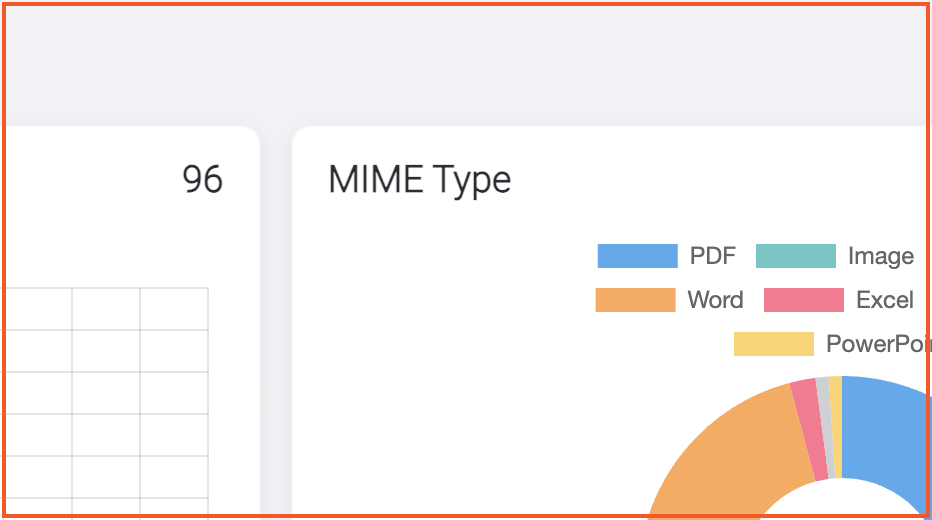
Understand which file types dominate uploads during the selected period. The Extension donut chart in System Activity groups documents into categories such as PDF, Image, Word, Excel, and PowerPoint.
Note: This action may require administrator privileges.
Prerequisites
- You are signed in to EisenVault One as a system administrator.
- You can open Dashboard from the left navigation.
Before You Begin
- The chart uses the same dashboard date range as Documents Uploaded.
- Legend labels come from file-type families, not every individual extension.
- When no documents exist in the period, the chart shows a neutral placeholder slice.
View the Extension Chart
- Open Dashboard.
- Set the date range, then click Apply Filter.
- Scroll to System Activity.
- Review the Extension donut chart and legend.
- Compare category sizes to spot format concentration or migration needs.
Example Walkthrough
Demonstration screenshots highlight the donut chart.
-
The Extension chart sits to the right of the upload trend chart.
-
Adjust the date range to see how file-type mix changes across months or quarters.
Expected Result
- Legend categories reflect uploaded documents in the selected period.
- The chart refreshes when you apply a new date range.
- An empty period shows the placeholder state instead of data slices.